Blog ala Vidar
SQL, AppFrame and other cool technologies
Sparse Columns
Posted by on August 23, 2009
You’ve probably seen this in a list of features in SQL 2008, but what exactly is it and how can you take advantage of it? A sparse column just means that it will not store NULL. When you have a NULLable field, NULLs are actually stored in normal columns. It doesn’t use much space, but still. So, why is this a problem? Well, if you have an index on a NULLable field, the index will have as many NULLs as the field and therefore not be particularly selectable. In some tables, like the Objects table in CMS there are MANY NULLable fields, which on most records are set to NULL.
A sparse column is stored as XML, so you only want to add this to fields that have at least 50% NULLs, since there’s an overhead for each field that has data. For example, an integer field non sparse uses 4 bytes. The same field with sparse, uses 8 bytes, but for non-NULL data. Let’s do a little experiment.
CREATE TABLE test1 (
	Field1 INT,
	Field2 INT SPARSE NULL,
	Field3 INT SPARSE NULL
)

CREATE TABLE test2 (
	Field1 INT,
	Field2 INT NULL,
	Field3 INT NULL
)

INSERT INTO test1
  (Field1, Field2, Field3)
SELECT TOP 100000
  ROW_NUMBER() OVER (ORDER BY C.id), NULL, NULL
	FROM sys.syscomments AS C
	CROSS JOIN sys.syscolumns

INSERT INTO test2
  (Field1, Field2, Field3)
SELECT TOP 100000
  ROW_NUMBER() OVER (ORDER BY C.id), NULL, NULL
	FROM sys.syscomments AS C
	CROSS JOIN sys.syscolumns

EXEC sp_spaceused 'test1'
EXEC sp_spaceused 'test2'
We create two tables, almost identical. The only thing different between these are that Field2 and 3 are SPARSE in test1. Then we populate both tables with 100000 records, and set NULL for Field2 and 3. This is the result I got from sp_spaceused:
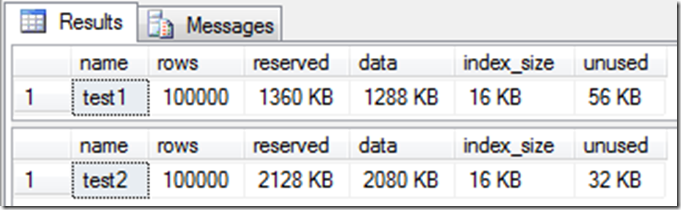
This tells me that for 100.000 records, two NULLable fields will all saves me (about) 1 MB with data when using sparse. Doesn’t sound much, but if you compare it to the one without sparse it’s almost 50%. And that’s with only two NULLable fields and no indexes. In one of our customers CMS database there’s over 300.000 records in their Objects table. This table has 55 NULLable fields. Doing a SELECT * on this tables, I see that most of the NULLable fields are actually NULL more than 80% of the time. Five of them are indexed too.
So, what’s the downside of sparse columns? Well, for starters it uses the double amount of space to store data, when it’s not NULL. You can not use text, ntext, geometry and geography, you can’t have default values on them. It is also not supported by merge replication. But it’s supported by AppFrame R3, so start using it!
One thing I forgot to mention is column sets. If you add a column set to your table with sparse columns, the sparse columns will be stored in this column (remember, it’s all just XML). Keep in mind that using column sets have more restrictions. For instance, you can’t change a column set. If you have a sparse columns in your table and you want to add a column set, you need to re-create the table.
One thing that’s “cool” about column sets though is that when you select * you get the column set (with your sparse columns) as an XML:
CREATE TABLE test3 (
	Field1 INT,
	Field2 INT SPARSE NULL,
	Field3 INT SPARSE NULL,
	MySparseFields XML COLUMN_SET FOR ALL_SPARSE_COLUMNS
)

INSERT INTO test3
  (Field1, Field2, Field3)
VALUES
  (1, 1, 1),
  (2, NULL, NULL),
  (3, 3, 3),
  (4, NULL, NULL)

SELECT *, Field3
	FROM test3
	WHERE Field2 = 1
The result:
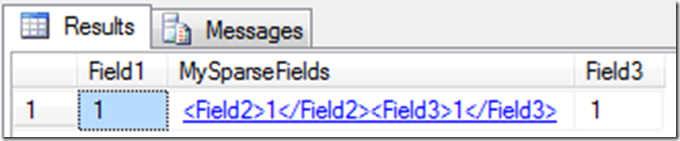
If you think this is something you should use, read more about it here:
My favorite bloggers at SQL Skills:
MSDN:
Using Sparse Columns
5 minutes interview #7 – Jekaterina Golouchova
Posted by on August 20, 2009
 Jekaterina, or Kate as everyone calls her, has been on my team since she started in Omega. Although she’s sitting in Lithuania we’ve had relative good communication via MSN. I’ve also been in Lithuania a couple of times to visit the guys (and girls). The thing I like the most about being in Lithuania is that I get to talk ALL the time. When I’ve been there we’ve had almost non-stop sessions about SQL, .NET and other interesting topics.
How did you start in Omega, and how was your first day?
In 2006 I finished the University and sent my CV to UAB Omega. After the interview I was sure I wouldn’t get the job, because I haven’t had enough experience. So I was very happy to receive an offer to work in UAB Omega as a trainee. On the first working day we had session about TeamDocuments and after that I started with AppFrame certification program.
What have you been working with?
When I have started in Omega I was working with CR1/CR2 bugs, AppFrame Reports and some SQL stuff. During that period one of the most interesting tasks was to create the "Dynamic Reports" concept in CR2. I learned a lot of new things while I was working on it. Now I’m working with CR3 (create new forms, fix bugs and etc.), reports and SQL-code.
What do you think is the most interesting thing to work with? Any examples?
Till now everything I’ve worked with have been very interesting for me. I like to work with forms (create new, make changes etc.), reports (reports with sub reports, writing script, reports with charts), fix bugs (figure out why this bug appears, how to fix it), work with SQL Server (create views, SP, work with triggers, overview what’s new) because every time when you work with all these stuff you learn something new.
Except computer stuff, do you have any hobbies?
I like to read (most often humorous fantasy). Not long ago I bought an e-book reader so now it’s more convenient to read books. Also I like to ride my bicycle (especially to the seaside). Sometimes when I’m not lazy I go in for sports (aerobics, swimming or other sport exercises). When I have a good mood and inspiration I like to cook. And also I spend a lot of time with my family.
Comma Separated List in SQL
Posted by on August 19, 2009
What do you do if you got some records of for example users and you want to return them in a comma separated list? Most of you will probably do something like this:
SET NOCOUNT ON

CREATE TABLE MyTable (
	Login NVARCHAR(128)
)

INSERT INTO MyTable
  (Login)
VALUES
  ('Vidar'), ('Johnny'), ('Peter'), ('JanCB'), ('Georgij'), ('Tomas'), ('Torgeir')

DECLARE @Logins AS NVARCHAR(MAX)
DECLARE @Login AS NVARCHAR(128)

SELECT Login
	INTO #MyLogins
	FROM MyTable

WHILE EXISTS (SELECT * FROM #MyLogins)
BEGIN
	SELECT TOP 1
	  @Login = Login
		FROM #MyLogins

	IF @Logins IS NULL
	BEGIN
		SET @Logins = @Login
	END
	ELSE
	BEGIN
		SET @Logins = @Logins + ', ' + @Login
	END

	DELETE
		FROM #MyLogins
		WHERE Login = @Login
END

DROP TABLE #MyLogins
DROP TABLE MyTable

PRINT @Logins
Yes, I know. This is not best practice with creating two tables etc…. but you get my point. Looping through a record set and add a field to a variable. But, why not just do:
SET NOCOUNT ON

CREATE TABLE MyTable (
	Login NVARCHAR(128)
)

INSERT INTO MyTable
  (Login)
VALUES
  ('Vidar'), ('Johnny'), ('Peter'), ('JanCB'), ('Georgij'), ('Tomas'), ('Torgeir')

DECLARE @Logins AS NVARCHAR(MAX) = ''

SELECT @Logins = @Logins + Login + ', '
	FROM MyTable

DROP TABLE MyTable

PRINT SUBSTRING(@Logins, 1, LEN(@Logins) - 1)
This works in SQL Server 2005 too. You just have to SET @Logins = ‘’ after you declare it. And you need to split up the values to be inserted.
5 minutes interview #6 – Vadim Naroznij
Posted by on August 13, 2009
 Vadim is Omega’s chief in Lithuania. We’ve played tennis several times and he and his brother are always nice to me when I’m visiting Lithuania. He and Loretta also made a very cool game when we had a teambuilding in Klaipeda.
Do you remember your first day in Omega?
The next day after receiving my master diploma at university (in July 2005) I came to Norway to work for Omega AS. I was assigned to the Drift department that Eiolf Berge was at the time running. This was actually not my first meeting with Omega and AppFrame – I have been communicating with Eiolf for a half of year over email and had already completed the CR1 certification program, and read quite many documentation files by that time. So I was at ones assigned to solve a nasty bug inside CR2 client (which was quite fresh back then). Coming from web development background, this was a tough challenge.
I remember you did the first eFaktura (electronic invoices) in Omega. What else have you been doing?
That’s right – eFaktura application was a web service client for submitting invoices to Statoil directly from AppFrame. Statoil was so impressed how fast and neat we did the implementation that I’ve got a year-long assignment in their IT department in Stavanger (working remotely from Ølensvåg) to help other suppliers implementing and debugging similar solutions. This job made me learn many interesting standards and technologies like E2B, xCBL, PIDX, XSD, WSDL, BizTalk. A bit later I have been assigned to a project integrating PIMS 2000 with the production database in Ølen Betong. Being transferred to the Technology department I was somewhat involved into system world development and documentation, created a new AppFrame certification program for newcomers. Apart of that I was involved in many internal applications development including Travel Expenses, Group SMS, Telephony, My CV, Timesheet, CR3 email application, mail server services and eLearning courses. Over the time I had a chance to participate in some PIMS modules development – such as CMS, ResourceMgmt, DocMgmt, QuantityMgmt, ProjectPortals. Since 2006 when Omega established an office in Klaipeda (Lithuania), I have been leading the daughter company and mostly working from here.
If anyone visit Klaipeda, which places should they see?
Let’s start with that if you plan to visit, it’s best to look into the events calendar on e.g. Klaipeda.lt web page – than you might come just in time for some cool events like the yearly international Jazz festival or a Midsummer festival or maybe the famous Sea festival, which by the way was held on the last weekend and was topped with arrival of the whole "Tall ships races Baltic 2009" fleet (there were also two sail ships from Norway :). If you happen to be in Klaipeda when no events are happening, I’m pretty sure that there will be someone from our friendly local team who will show you around: old town streets, panorama from 21st floor lounge bar, sea/clock/amber museums, white sandy beaches and introduce you to some Lithuanian cuisine specials 😉
What hobbies do you have, except computer stuff?
Apart of being a geek, I also like fishing, hiking and shooting (that’s why I like staying in Norway – there’s plenty of either). I enjoy casual sports activities like cycling, volleyball or jogging (latest addition: skiing). After spending almost the whole day at the PC, I hate reading, but I like fiction books… – my solution is audio books (note: don’t get too involved while cycling).
Tool belt
Posted by on August 13, 2009
Everyone has a couple of applications that they can not live without. Here’s mine:
7zip
A free (both as of cost and as in open source) (de)compression tool that handles all the formats worth mentioning, including zip, gzip, bz2 and rar.
Fences
A great tool which enables you to create “fences” on your desktop. This means that’ you’re grouping icons together like I’ve done on the screenshot

Filezilla
Open source FTP client which supports FTP, FTPS, FTPES and SFTP.
Live Mesh
Great tool which enables you to share folders between computers, and users. You can also access these folders from the web, if you’re for instance sitting in a internet café.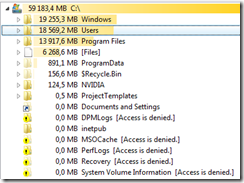 I’ve written a blog post about this. You can read it here.
TreeSize
A little tool which lets you easily view in a tree how much space every folder uses like in the screenshot to the right.
Virtual CloneDrive
This is a tool to mount ISO files. I’ve been using daemon tools for many years, but this is truly better. For starters, you don’t need to restart either on desktops or servers.
You see any tools that I should be using? Please comment!
For the record, Visual Studio, SQL Server, Office etc aren’t tools you can have in your tool belt. They’re too big 🙂
Social Networks
Posted by on August 10, 2009
A couple of weeks ago I removed my accounts at facebook, MySpace, LinkedIn etc. Why? Because I’m sick and tired of getting mail with invites for stupid things that I don’t care about. The only social network I’m now a member of is twitter. This is different. For starters, there’s almost no “kiddies” there. Most of you probably know what twitter is but for you that don’t, read here. At first I didn’t want a twitter account, because I don’t care what everyone is doing all the time. But, I found out that this is not the primary usage. At least not for IT-guys. It’s very good to for example share interesting links.
At twitter, there are a couple of things you should know. When using a hash tag (#), you’re referring to a topic which is searchable, so when a user search for “windows7”, all your tweets with #windows7 in it will show. You can also click on these hash tags and see other people’s tweets about this topic. When referring to a user you use the @. For example my user is known as @vidarnordnes, so if you want to write something to me, you’ll write: “@vidarnordnes: Good morning”, and if I want to ReTweet, I write: “RT @johnnyvik: Good morning”. These are all public messages, but you can also send direct messages which only can be read by the recipient.
So, who’s worth following? You can go here to find the persons I’m following. Here’s a list of (in)active Omega twitters:
- Johannes Tornes
- Johnny Vik
- Neil Carlsen
- Omega PS
- PIMS R3
- Thomas Sundsøy
- Torbjørn Vik Lunde
- Trygve Haaland
- Vidar Nordnes
- Werner Waage
And here’s a list of my favorites:
- Einar Ingebrigtsen (Chapter leader for NNUG Vestfold and Silverlight MVP)
- Joar Øyen (Chapter leader NNUG Trondheim and .NET MVP)
- Jon Arild Tørresdal (Chapter leader of NNUG Bergen)
- Kimberly L. Tripp (SQL Skills)
- Lars Wilhelmsen (Leader of NNUG and MVP)
- NNUG Haugesund
- Paul Randal (SQL Skills, former Microsoft employee)
- Pinal Dave (SQL Server MVP)
- Run As Radio (Podcast for IT pro’s)
- Rune Grothaug (Microsoft employee, responsible for NDC etc)
- Scott Guthrie (THE .NET guru)
- Scott Hanselman (Program Manager at Microsoft)
- Steve Riley (Security expert, former Microsoft employee)
BTW! Please rate blog post. If you think this blog post was stupid, set it to 1. If you loved it set it to 5. That way we know what topics to keep posting blogs about 🙂
5 minutes interview #5 – Håvard Ravatn
Posted by on August 6, 2009
 Since I first met Håvard, he’s been teasing me about me being a "Karmøy-bu" (a guy from Karmøy). This is of course a great excuse if I’ve got a PEBKAC, I can just say "Hey, I’m from Karmøy…". Håvard has been Trygve’s right hand for several years, and the only bad thing he has to say about Håvard is that he’s working to fast. He can build PIMS in 3 hours. That’s even faster than Johnny! That’s of course not a bad thing but to be honest Håvard is a very clever guy. He’s also started blogging at http://blogs.appframe.com/havard/ Stay tuned for blog inputs!
So, Håvard: How and when did you start in Omega?
Being from Ølen I’ve known many of the ‘founding-fathers’ of Omega for quite a while. I got my first pay-check from Omega some 15 years ago having a summer-job painting parts of the then brand new main office in Ølensvåg. After finishing collage in 2003 I had a word with Torleif and applied for an open position as system-engineer which I didn’t get. Instead I started on master-level studies, but luckily I got a phone-call from Lars the following Christmas about an open position. I got an interview with Svein Tore who took his chances and hired me. I had my first day as a “real” Omega-employee in January 2004.
What have you been doing all these years?
I started out in Svein-Tore’s department, got my ‘basic-training’ in the Omega-office in Stavanger, and then worked mainly with CMS-related stuff for Statoil and ABB Offshore for a few of months. In June 2004 I was asked to go Bonn, Germany to work for TGE for a ‘couple of weeks’. In true Omega-fashion I ended up working in Germany for almost 18 months! After returning to Norway I worked in Ølensvåg for a couple of months and then started working for Aibel in Stavanger in February 2006. I stayed there until about a year ago when I moved to Bergen and starting working at the new Omega branch-office. At present I do work for several clients such as Aibel, Seawell, Siemens and StatoilHydro.
What’s the "main theme" of your blog going to be?
I haven’t really decided what to blog about, but I’ll probably focus on AppFrame and PIMS related stuff. I hope to share some of the tips, tricks -and knowledge I’ve picked up during my years in Omega.
Do you have any hobbies, except computer stuff?
I listen a lot to music and waste countless hours in front of my stereo-system. Now and then I try to get some exercise and usually take hikes in the mountains surrounding Bergen. I’m also a Discovery Channel-addict!
Virtualization
Posted by on August 1, 2009
This is a very popular topic in the IT industry nowadays. Some believe it’s because of the global warming “wave”, but I tend to think it’s more than just that. Let’s dive into it!
My first meeting with this technology was about 8-10 years ago. I was running Linux, but wanted to have the possibility of also using Microsoft applications without having to do a reboot. I installed VMware and created a virtual machine inside it running Windows. I also remember the IT administrator at high school telling me that another high school was running Linux with multiple VMware machines, running Windows Server.
So, what is virtualization? According to Wikipedia, virtualization is “a broad term that refers to the abstraction of computer resources” and a virtual machine is “a software implementation of a machine (computer) that executes programs like a real machine”. I would describe it as making it possible to utilize more of the physical hardware available. Virtualization is a broad term, and is used for Application Virtualization (remote desktop-like) etc, but we’ll focus on hardware virtualization in this blog post. In fact, most of the servers out there are idling most of the time. I’m not thinking of the servers hosting Microsoft.com, Google.com etc but any other not that heavily used. In Omega we’ve got about 20-25 physical servers. What do they do? Domain controllers, DNS, mail, database, backup, web etc. Between 8 and 16 there’s some load on these servers, but how much of the actual hardware do you think is being used when most of Omegas employees are at home? Why should they then use the same amount of power, producing the same amount of heat etc as when we’re actually working? A couple of years ago we bought our first “hosting server”. If I remember correctly it was running 8 CPU cores and 16GB RAM. We installed VMware on this to run our test-servers in the technology department. In here we had our own Domain controller, web servers etc. After a while we bought several “hosting servers”, and now we’ve converted all of them to Hyper-V, Microsoft’s virtual servers. Today we got over 20 virtual servers. Most of them are test-servers, like SQL, web, XP (to test IE6) etc, but also some production servers. There are several reasons why we do this.
- Reduce the cost of having to buy multiple servers.
- Less power consumption which leads to less head and lower electrical bills.
- Less administrative work because we can log on to the physical box if a virtual server crashes, instead of going to Ølen in the middle of the night to reboot a computer.
- Enables us to add more “juice” if needed
You might think “isn’t this like putting all your eggs in one casket? Well, yes and no. Of course, many of the servers are running on the same hardware, so if one physical server crashes we got a bigger problem than if one of them crashed as a physical server. But, the quality of these servers tend to be much better than cheaper servers, and we’re able to run RAID10 on all servers, so if one disk crashes, the server’s still running. Also, in Windows Server 2008 R2 there’s a new feature called “live migration” which enables you to automatically move virtual servers between the hosting servers.
So, what should run as virtual server and what should still be on “bare metal” (physical box)? SQL Servers with heavy load should not run as virtual servers, because of the heavy disk IO. SQL Server love RAM, you should feed it like a hungry baby. AD controllers and exchange servers should also run as physical boxes, but there’s no reason why for example web-servers should run on physical servers. By the way, did you know that Omega only runs web servers on virtual servers? For example, TeamDoc have been running on a virtual server for several months.
I’ve had several discussions with people that are skeptical to virtual servers, and I do understand them, but remember one thing. If you have ordered a 2 CPU server with 4 GB RAM, and suddenly figure out that this server isn’t good enough. What do you do? Well you probably have to order a NEW server because 32 bit servers only support 4 GB RAM. You would have to go for one new motherboard, CPUs, more RAM etc. What would you do if it was a virtual server? You’d call the administrator: “could you add 2 GB more RAM to my server? And while you’re at it add 2 more CPU cores.” The administrator then would go into his Hyper-V manage, right click the server. Shut down. Right click it again, Settings and add more RAM and CPU, and then start the server. It would take about 2 minutes compared to ordering a new server from Dell, which would take about 2 weeks, and would cost A LOT more. When we create new virtual servers, we normally add 1 CPU and 1 GB RAM. Then, if needed, we add more and it would only take a couple of minutes. Shouldn’t that be the way to go?
Btw, did you know that most of Microsoft.com, TechNet and MSDN are running on virtual servers?
Google features
Posted by on July 30, 2009
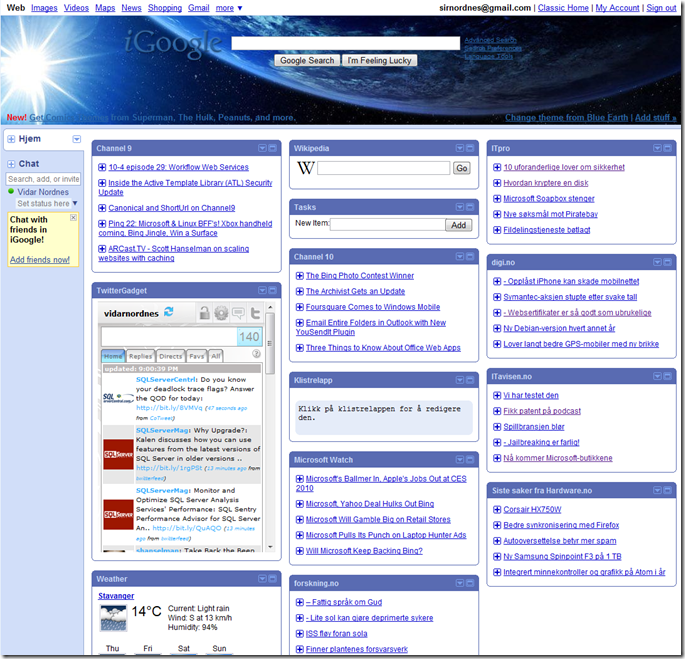
Google is the “one and only” when it comes to search, but Google also offer a lot of other features! Jon Kristian wrote about Google Wave which is going to be released this year. In addition to this they got for example iGoogle which is a very good and customizable start page. Here’s a screenshot of my iGoogle, were I’ve got news, twitter, search, tasks etc.
In addition, there’s Gmail, Picasa (where you can upload your pictures), Docs (word on web), Talk (MSN wannabe), Calendar, Sites, Maps, Translate and many more! The one that I’ve fell in love with is Reader. This is an RSS reader where you can have one place to read about everything that you care about (at least when it comes to computer-stuff). I also use it to get notified when there’s a new episode of one of the 20 series (yes, I know.. it’s a lot) I’m watching. All this with ONE login, and it’s even auto login! Sweet! Oh, did I forget the best browser on the market? Google Chrome
Btw, did you know that Google offers a lot of features also in the search field? Here’s a couple of examples you could try out:
weather Houston
5+1
100 EUR in USD
1 meter in inches
~cabin Vågslid
define:SQL
SQL site:blogs.appframe.com
The first one will of course show the weather in Houston. The second is calculating for you. Google can do complex calculations too. Conversions are a great feature when talking to for example Americans which always uses foot, inches, Fahrenheit etc. ~cabin means it will also search for synonyms like cottage. define is used for acronyms, and the last one you only search one site
NULL in check constraints
Posted by on July 29, 2009
I just stumbled over a bug in both SQL Server Engine and management studio thanks to Håvard Ravatn.
CREATE TABLE [dbo].[Table_1](
	[field1] [nvarchar](50) NULL
) ON [PRIMARY]

ALTER TABLE [dbo].[Table_1] WITH CHECK ADD CONSTRAINT [CK_Table_1] CHECK (([field1]=NULL))
ALTER TABLE [dbo].[Table_1] CHECK CONSTRAINT [CK_Table_1]

INSERT INTO Table_1 (field1) VALUES ('b')
This will actually allow you to insert ‘b’ into field1, although the check constraint says field1 = NULL. Now you’re probably thinking “has Vidar gone mad? He should know that you can’t do field1 = NULL, you do field1 IS NULL”. Well, don’t worry just yet. The reason I found this was because of a bug in management studio. If you create a check constraint for field1 where the expression is:
Field1 IN (NULL, ‘a’, ‘b’)
and then save the table, the constraint is actually stored as:
Field1 = NULL OR Field1 = ‘a’ OR Field1 = ‘b’
So, be aware of this bug.
Also, remember that NULL != NULL. One NULL value is NEVER the same as another NULL value, unless ANSI_NULLS are turned off.
I’ve reported this bug to Microsoft. Please validate it, as Microsoft fixes all bugs that has more than 5 validations: https://connect.microsoft.com/SQLServer/feedback/ViewFeedback.aspx?FeedbackID=478176
One thing I forgot to mention, as Johnny comments is that this is NOT the way to do things. Use “Allow null”


 Blog ala Vidar