Blog ala Vidar
SQL, AppFrame and other cool technologies
Category Archives: Published
LIKE vs. =
Posted by on June 29, 2009
There’s been quite a lot of changes in Ølen lately, but I’ll write more about that in a couple of days. Today I’ll tell you a couple of things about LIKE vs. = (equals). I got a phone call from Sigmund (btw, he’s much better now 🙂 today where he asked me why the following queries gave two different results:
SELECT something WHERE something = ‘string’
SELECT something WHERE something LIKE ‘string’
The first returned two records, while the second returned one. Strange? My first thought was unicode, but I didn’t actually know what happened here. The first record was ‘string’, while the second was ‘string ‘ (with a trailing space).
After some reading I found out that = removes trailing spaces. Just try for yourselves:
SELECT 1 WHERE CAST('a' AS VARCHAR(10)) = CAST('a     ' AS VARCHAR(10))
SELECT 1 WHERE CAST('a' AS VARCHAR(10)) LIKE CAST('a     ' AS VARCHAR(10))
Note that here we’re comparing ‘a’ to ‘a ‘ (five trailing spaces)
SELECT 1 WHERE CAST('a     ' AS VARCHAR(10)) = CAST('a' AS VARCHAR(10))
SELECT 1 WHERE CAST('a     ' AS VARCHAR(10)) LIKE CAST('a' AS VARCHAR(10))
Now we’ve switched places. We’re comparing ‘a ‘ to ‘a’. Suddenly it removes the trailing spaces on the left for both = and LIKE. Try changing to NVARCHAR instead of VARCHAR.
The conclusion is that when comparing strings it will always remove trailing spaces the left side, but only when using = on the right side.
EXCEPT if you’re using unicode 😀 When using LIKE on unicode it will not remove trailing spaces on either side! Confusing? Welcome to my world 🙂
Why convert to SQL Server 2008?
Posted by on May 7, 2009
I’ve been asked by a couple of people this question. Microsoft released SP1 a couple of weeks ago, but what’s the difference between 2005 and 2008, and when is the next version coming? The next version of SQL Server is scheduled for 2011 (NB! This is a rumor!!!). That’s two years. Then SQL Server 2005 will be… 6 years old. Anyhow, here’s a list of nice features that you don’t got in 2005:
For developers:
- New column types – Date, Time, Datetimeoffset, Datetime2
- MERGE statement
- Sparse Columns – Performs very good compared to large tables with many NULL-able columns
- Spatial Data types – Geometry etc
- Transact-SQL IntelliSense
- Table Valued Parameters
- Grouping sets
For DBAs:
- Easier to maintain multiple servers
- Transparent Data Encryption – Encrypt the physical database files without any application changes
- Auditing
- Resource Governor – ability to set "maximum CPU/memory usage" on heavy queries, users etc
- Data Compression – Reduce the storage requirements of both database and backups
- Performance Data Collection – Makes it easy to find issues and bad performing queries
- Integrated Full Text Search
- Policy management
- Database Mirroring – Improved compared to 2005 with automatic page recovery of corrupted pages
- Hot Add CPU
Keyboard shortcuts in SSMS
Posted by on May 5, 2009
You can save a lot of time using simple keyboard shortcuts. Here’s a list of my favorite shortcuts in SQL Server Management Studio. NB!!! You might have to go in to Tools –> Options –> Environment –> Keyboard and press “Reset to default”.
| Action | Shortcut |
| New Query Window | CTRL + N |
| Close window | CTRL + F4 |
| Delete all text in current tab | CTRL + SHIFT + DEL |
| Selected text to UPPER case | CTRL + SHIFT + U |
| Selected text to lower case | CTRL + SHIFT + L |
| Selected text to comment | CTRL + K, CTRL + C |
| Uncomment selected text | CTRL + K, CTRL + U |
| Info of selected object (text) | ALT + F1 |
| Include actual execution plan | CTRL + M |
| Switch between tabs | CTRL + TAB |
| Object Explorer Details | F7 |
| Object Explorer | F8 |
The how’s and why’s about indexes, part 2
Posted by on April 23, 2009
SQL Server uses something called a B+tree. Some of you have probably gone to school and learned what this is, but I’ve used some time to really understand this. What is a B+ tree and what does that have to do with indexes? Well, when you insert a record into a table (with an index), these values will be populated into a tree to make it easier to search.
Download a little application called STX B+ Tree Demo. Set data type to integer and node slots to 4 and click “Insert Random” and choose “Insert 20 Random Integer Pairs”. This will leave you with something like this:
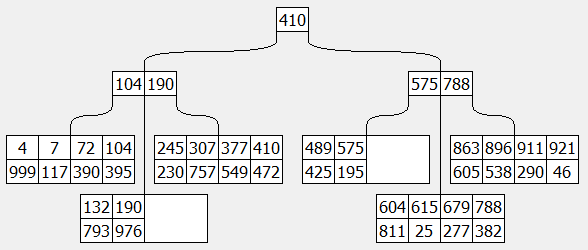
On the top we’ve got a root node (410). This is the KEY. If you look a bit more down, you’ll find 410 once more, but then with 472 under it. 472 is the VALUE for KEY 410. On the left of the root node, you’ll find all keys that are LESS OR EQUAL to the root node. Both 104 and 190 is less than 410. This level is called the intermediate nodes, and on the bottom you’ve got the leaf nodes. So, if we’re for example looking for the key 679, we start at the top. It’s more than 410, and therefore we move to the right. It’s between 575 and 788, therefore it’s in the middle of these. Then there’s only 4 keys to search in till we find what we looked for: 679, and the value is 277.
Now, compare this to our world. If you set an index on three columns, all three of them will be the key in this index. If you add included columns, these will only exist in the leaf node. But, what if you DON’T add included columns in the index. What will then be the value? RID. Row ID. You might have seen “RID lookup” in the execution plan. In the value of the leaf nodes, there’s always stored a RID (and if exists, included columns). This will point it to the correct row in the table. So, the reason for adding included columns is to get rid of the RID lookups. Also, it might be a good idea for covering indexes, since the total amount of bytes in an index (excluding the included columns) can maximum be 900 bytes.
Visit from Jon Jahren
Posted by on April 22, 2009
Mr. Jon Jahren visited us yesterday, and we talked about SQL Server for 4 hours. It was fun, and very informative. I learned A LOT! In this blog I’ll try to sum up the most interesting discussions we had. We had a list of "questions" prepared for him:
– Tuning of (the setup of the) main SQL Server
– Specking new servers
– B-trees
– Mobile sync vs Replication
– Resource Governor
– Reporting Services
Tuning of (the setup of the) main SQL Server
First of all we logged on to the main SQL Server in Omega and started looking at hardware setup, settings on the server, database etc. The hardware setup was as it should be, but he explained a couple of settings that he recommended.
"Boost SQL Server priority". This will, as it says, boost the priority of SQL Server on the CPUs. This should be turned off, because IF the server has some queries running 100% of the CPU you might not be able to log on to the server and kill those processes. He also explained that if we had network related problems, it might be a good idea to uncheck one core pr CPU, to let them deal with OS-related stuff (network). That way, SQL Server will not try to use these cores and therefore not be put in a queue.
Under security on the server, there’s a option called "Enable Common Criteria compliance". This is a security feature that makes SQL Server not only release memory but overwrite memory with white-spaces or similar. Many customers has this as a criteria when setting up SQL Servers, so be aware!
Named pipes should be disabled when you’ve got more than 500 users because this might cause performance issues if there’s more than 500 connections!
When we talked about hardware setup, he reminded us about the problems with RAID5 and said he was a member of BARF(.com)
NB! Before SQL Server 2008 it was recommended to have the same amount of MDF files for the database as you’ve got CPU cores. This no longer applies to user databases, but this still applies to tempdb.
Specking new servers
Fast Track is collaboration between Microsoft, HP, Dell and Bull. This is a sort of standard for specking new servers. The only "thumb rule" we got was CPU cores X 4 = GB of RAM. We should double the amount of memory on our SQL Server.
B-trees
What’s the difference of a column in the index and an included column? First of all, you can’t filter on the included column. The reason they added included columns (or leaf node columns, as Jon wanted it to be called) was that the limit for indexes are 900 bytes. But in some cases you might want to select more than 900 bytes, but only filter on one or two fields.
Mobile sync vs Replication
We talked a bit about the differences between SQL Server Compact Edition and Express edition. CE was actually built with "cloud computing" in mind. CE should only be used as a local cache of data while it’s offline. EE could be used as a subscriber, or as a publisher/subscriber in merge-replication.
Resource Governor
This is a great tool for allocating resource. I’ve now set up a resource pool that restricts backups to only use 20% of the CPU. This means that users will hardly notice when we run backups (especially transaction log in the middle of the day). You can set various restrictions. For example I could make two pools and check for SUSER_SNAME(). If it’s me, then no restrictions, if it’s anyone else, use max 10% of CPU, RAM etc. I bet that would make my queries even faster! 😀
Reporting Services
We’ve changed our reporting engine a couple of times, and I know people are tired of recreating reports. Pr now, Reporting Services isn’t "good enough" for us, but MY PERSONAL OPINION (NB!!!! THIS IS JUST MY PERSONAL OPINION!!!!!) is that when reporting services is good enough, we’ll change to this. SQL Server 10.5 (2008 SP2?) will be released among with Office 14. In this release there will be no big changes to Reporting Services, but the release after this (11… Q2 2011?) will include a lot of changes to the Reporting Services tools. Most of them is actually ready already, but not included. So, no worries. I don’t think we’ll change reporting engine for at least 2-3 years 😉
I mentioned office 14. This will include an application codenamed Gemini. This is excel on steroides. The main goal for this application is to suite the needs of the heavy excel experts out there. With this you can connect to almost any database (dataware house), and play with millions of records in a couple of milliseconds. Looking forward to try this!
BTW! Did you know that the S in SUSER_SNAME() stands for Server?
If you log in to teamdocuments you can download all the files he sent me.
Computed Columns
Posted by on February 11, 2009
You might have heard the expression “computed column” before. If not, it’s an expression used for columns that are computed 🙂 A little more detailed, Field3 may be Field1 + Field2, Field1 * Field2 or similar. This is actually a pretty neat feature in SQL Server. Why? Let’s take a transactions table in an accounting system as an example. We’ve got a field called CurrencyAmount and one field called ExchangeRate. In most cases you want to calculate these as your currency’s amount. Therefore you make a field called Amount, and sets it as a computed column with the following formula: CurrencyAmount * ExchangeRate.
So, in your views, you can just use:
SELECT Amount FROM Transactions
Instead of:
SELECT CurrencyAmount * ExchangeRate AS Amount FROM Transactions
Also, you will always get the correct amount. In some cases I’ve seen people who have made a column “Amount” which was not computed. Then the user has to insert values into all three fields, and this might cause issues. Some users only use the “amount” field, others only the CurrencyAmount etc.
But what about persisted vs non-persisted? Persisted means that it’s stored WHEN SAVING the record. This means that every time you select/filter on the column, it’s picking data from the hard drives. If you’ve got heavy calculations this might be the best thing, but in many cases non-persisted is the best thing. Non-persisted means that it’s calculating Currency * ExchangeRate for each record when you SELECT the record(s). You might think that this is slower, but with the CPUs nowadays, this isn’t a problem at all. The bottleneck for SQL Server is disks, or IO-activity. You (almost) always want to reduce the amount of IO in a query, so next time you make a computed column, take a minute to think about if you want it persisted or not 🙂
And, just for the record. You can only have persisted computed columns in tables. Computed columns in views will always be non-persisted.
Live Mesh
Posted by on January 18, 2009
Microsoft released Live Mesh (beta) to the public April last year. I’ve only been using it a couple of days, but I wish I had noticed this before! On www.mesh.com the slogan is “Sync, share, and access the information you care about – wherever you happen to be.”. I think this explains most of it. Live Mesh is a service from Microsoft that you can connect to either using your browser (from anywhere in the world), or using an application installed on your PC. If you install this application, it integrates with windows explorer. All Mesh-folders have a blue folder-icon. If you got a folder you want to share with mesh, you just right-click it and choose “Add folder to Live Mesh”. You can also add permissions on this folder so your friends can get access to it. I’ve tested this with a folder I call “VS projects”. On my spare time I’ve been working a bit with an IRC client. I wanted to share the source code with Jan Leon, so I gave him permissions to the folder, and 30 seconds later, he had it on his desktop without doing ANYTHING. Live Mesh did the synchronization automatically.
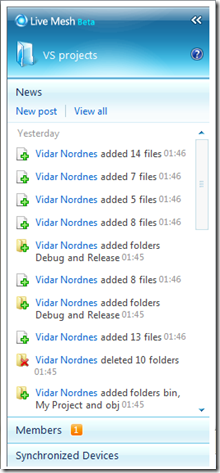
On all folders you’ve got a little extra window on the right. There are three tabs. News, Members and Synchronized Devices.
On News you can see all information about the folder. Who added or deleted which files. New members of the folder etc.
In the Members tab you can see who’s got permissions to this folder and what permissions the user got. As long as your friend got a live-address (for use with MSN or similar), you can add your friend to this.
On the Synchronized Devices tab you can see which computers (and sites) are connected to this folder at the moment, and where your changes will be synchronized.
I’m now using this for backup. I’ve only got a couple of documents I don’t want to loose. Nothing confidential, just a lot of work to redo if lost.. All other files and applications can be downloaded from the internet, so no need to worry there.
On News you can see all information about the folder. Who added or deleted which files. New members of the folder etc.
In the Members tab you can see who’s got permissions to this folder and what permissions the user got. As long as your friend got a live-address (for use with MSN or similar), you can add your friend to this.
On the Synchronized Devices tab you can see which computers (and sites) are connected to this folder at the moment, and where your changes will be synchronized.
I’m now using this for backup. I’ve only got a couple of documents I don’t want to loose. Nothing confidential, just a lot of work to redo if lost.. All other files and applications can be downloaded from the internet, so no need to worry there.
NB! Be aware that there are a limit on the size of your folders. It’s about 5GB, so you shouldn’t worry too much.
#AppFrame@EFNet
Posted by on January 17, 2009
As some of you might have noticed, I’ve had #AppFrame@EFNet as my personal message on MSN. What does this actually mean?
IRC (Internet Relay Chat) is a technology developed as early as in 1988. It’s a chat protocol. The main idea is that there are several servers connected in a network, which clients can connect to to chat with others. The idea behind MSN is in many cases very similar to IRC. The only main difference, in my eyes, is the channels. If you want to start a group discussion on MSN you have to invite several people to your conversation. This can easily be a mess. What do you do if you just need help with something, or want to chat about one topic and don’t care who answers? Well, MSN does not have any features like this. IRC on the other hand has channels. You can join any channel you want. I’ve started #AppFrame (# means it’s a channel) on the EFNet network. Anyone can join to chat, or get help with AppFrame related technologies. NB!!! THIS IS NOT AN OFFICIAL SUPPORT CHANNEL FROM OMEGA!
You can also join other channels to chat, or get help with other technologies. I myself have joined #Haugesund (my hometown), #sql and #appframe. There’s also channels like #vb, #aspnet etc.
Looking forward to have a chat with you on IRC!
Norwegian Podcast
Posted by on January 15, 2009
Einar Ingebrigtsen (Chapter Lead of NNUG Vestfold) have just started a Norwegian podcast. You can find it at http://www.ingebrigtsen.info/ . His first podcast is a intervju with Jon Arild Tørresdal about Agile development. Jon Arild is by the way the Chapter Lead of NNUG Bergen. You might notice his accent. He’s from Haugesund but have lived in Bergen for quite some time.
NB! I might have to start podcasting soon 😉 In English though..
SMO
Posted by on January 12, 2009
SQL Server Management Objects is a set of .NET objects from Microsoft. This replaced DMO (Distributed Management Objects) in 2005. You can use SMO to communicate with a SQL Server the same way you do with Management Studio. For example, you can list all tables, script them, find your permissions+++. You even use it to communicate with SQL Server Agent to make jobs etc!
The last days I’ve been working on a little application we’ll use to script over a database automatically. First we’ll delete all a-objects, then we’ll script them in from another database.
I’ve made an example project, so you can see how easy it is. First connect using a ServerConnection, and then setting the gServer. With gServer I can access any object I want on the server. To access a table, you use: gServer.Databases(“YourDatabaseName”).Tables(“YourTableName”)
To generate all my scripts, I’m looping the Script-method on the Tables property. I add a parameter vOptions so I only get what I want (dependent on which checkboxes are checked.
Click here to download the test project.


 Blog ala Vidar